Example: XGBoost power loss
This examples shows you how to load the trained XGBoost model and use it.
[1]:
import os
from pathlib import Path

project_root = Path.cwd().parents[1]
os.chdir(project_root)   # now cwd is .../pvcracks

from pvcracks.powerloss.powerloss_functions import load_xgb_models, predict_power_and_voc
import numpy as np
import pandas as pd
Calculate delta Pmpp from fitted IV cell curves
[2]:
Cell9Master = pd.read_csv('docs/data/ELdata_module_209_VAE_analysis.csv', index_col=0)
[3]:
# grab each Module’s Init‐stage Pmp
init = (
    Cell9Master[Cell9Master['Deg']=='Init']
    .set_index('Module')['Pmp']
    # init is now a Series: index=Module, value=Pmp_at_Init
)

# Calcuate differenc in %
Cell9Master['deltaPmp'] = 100*(Cell9Master['Pmp'] - Cell9Master['Module'].map(init))/Cell9Master['Module'].map(init)
[4]:
#Filter out specific cells we know have cracks
cracked = [
    ('209_A2','Deg1'),
    ('209_A1','Deg1'),
    ('209_A3','Deg2'),
    ('209_A1','Deg2'),
    ('209_C3','Deg2'),
    ('209_B2','Deg2'),
    ('209_B3','Deg2'),
]

# 2) build a boolean mask which is True only for those pairs
mask = Cell9Master[['Module','Deg']].apply(tuple,axis=1).isin(cracked)

# 3) slice to keep only the cracked cells
Cell9Degs = Cell9Master[mask].copy()
[5]:
Cell9Degs
[5]:
| ELPath | Module | Deg | Rs | Rsh | I | Is | N | Pmp | Vmp | Imp | lat_vec | klabel | deltaPmp | |
|---|---|---|---|---|---|---|---|---|---|---|---|---|---|---|
| 11 | /docs/data/EL/209_A2/Deg1/209_A2_0005_2021_04_... | 209_A2 | Deg1 | 0.008996 | 1295.750000 | 8.228613 | 9.005018e-08 | 1.317542 | 3.534448 | 0.465455 | 7.593540 | [ 5.0129116e-02 1.5392177e+00 1.2010708e+00 ... | 4 | -0.254354 |
| 12 | /docs/data/EL/209_A1/Deg1/209_A1_0005_2021_04_... | 209_A1 | Deg1 | 0.010386 | 1.000000 | 8.184377 | 1.006196e-05 | 1.778587 | 3.051399 | 0.446061 | 6.840773 | [ 0.1527828 0.6933546 0.61783403 -1.311733... | 1 | -13.414670 |
| 18 | /docs/data/EL/209_A3/Deg2/209_A3_0005_2021_04_... | 209_A3 | Deg2 | 0.008634 | 8.986411 | 8.233849 | 6.987570e-06 | 1.730266 | 3.349300 | 0.458990 | 7.297111 | [ 1.6261781e+00 -1.3577162e-01 3.6160046e-01 ... | 4 | -6.030860 |
| 21 | /docs/data/EL/209_A1/Deg2/209_A1_0005_2021_04_... | 209_A1 | Deg2 | 0.012567 | 0.835178 | 7.588188 | 3.762260e-05 | 1.997049 | 2.678277 | 0.433131 | 6.183523 | [-1.2965436 0.14127842 0.39876893 -0.320378... | 1 | -24.002233 |
| 23 | /docs/data/EL/209_C3/Deg2/209_C3_0005_2021_04_... | 209_C3 | Deg2 | 0.009595 | 88.786965 | 8.160221 | 1.795159e-06 | 1.573030 | 3.347141 | 0.452525 | 7.396585 | [-4.2912847e-01 2.1230426e+00 8.3105731e-01 ... | 3 | -3.268041 |
| 25 | /docs/data/EL/209_B2/Deg2/209_B2_0005_2021_04_... | 209_B2 | Deg2 | 0.009456 | 529.959186 | 8.231207 | 3.558481e-06 | 1.644547 | 3.346776 | 0.452525 | 7.395777 | [-0.2521562 0.70483327 1.0419804 -1.359632... | 1 | -4.311519 |
| 26 | /docs/data/EL/209_B3/Deg2/209_B3_0005_2021_04_... | 209_B3 | Deg2 | 0.010031 | 97.047204 | 8.309195 | 1.610765e-06 | 1.567835 | 3.399534 | 0.452525 | 7.512363 | [-1.8619239 1.6475563 1.0302961 -1.493011... | 1 | -4.495282 |
Load latent vectors:
We show in the EL variational autoencoder (VAE) example “Rapid EL processing” how to obtain these.
[6]:
#reformat latent vectors to np.array[np.array[],...]
def parse_whitespace_vec(s):
    # strip off the brackets, then split on any whitespace (incl newlines),
    # then convert each token to float
    nums = s.strip('[]').split()
    return [float(x) for x in nums]

# apply parsing
parsed = Cell9Degs['lat_vec'].apply(parse_whitespace_vec)

# 2) stack into a numpy array of dtype object
lat_vectors = np.array(parsed.tolist(), dtype=object)
Load xgboost models:
[7]:
pmpp_model, voc_model = load_xgb_models(
        pmpp_model_path="pvcracks/powerloss/xgb_model_pmpp_diff_percent_3CH.pkl",
        voc_model_path="pvcracks/powerloss/xgb_model_Voc_diff_percent_3CH.pkl"
    )
Predict delta Pmpp in %
[8]:
df_predictions = predict_power_and_voc(lat_vectors, pmpp_model, voc_model)
[9]:
#power loss predictions added to cell info dataframe
Cell9Degs.loc[:, 'power_loss_%'] = df_predictions['power_loss_%'].values
[10]:
Cell9Degs[['Module', 'Deg', 'deltaPmp', 'power_loss_%']]
[10]:
| Module | Deg | deltaPmp | power_loss_% | |
|---|---|---|---|---|
| 11 | 209_A2 | Deg1 | -0.254354 | -13.171658 |
| 12 | 209_A1 | Deg1 | -13.414670 | -12.675356 |
| 18 | 209_A3 | Deg2 | -6.030860 | -15.003642 |
| 21 | 209_A1 | Deg2 | -24.002233 | -10.363716 |
| 23 | 209_C3 | Deg2 | -3.268041 | -7.291249 |
| 25 | 209_B2 | Deg2 | -4.311519 | -18.673622 |
| 26 | 209_B3 | Deg2 | -4.495282 | -15.299884 |
[11]:
#Compare IV fit results vs XGboost
import matplotlib.pyplot as plt

x = Cell9Degs['deltaPmp']
y = Cell9Degs['power_loss_%']

# compute correlation
r = x.corr(y)

plt.figure(figsize=(6,4))
plt.scatter(x, y, alpha=0.7)
mn = min(x.min(), y.min())
mx = max(x.max(), y.max())
plt.plot([mn,mx], [mn,mx], 'r--', label='y = x')
plt.text(x.min()-0.9, 0, f"Pearson r = {r:.3f}", fontsize=10, verticalalignment='top',
        bbox=dict(boxstyle='round', facecolor='white', alpha=0.7))
plt.xlabel('Cell delta Pmp from IV curves (%)')
plt.ylabel('Power Loss from latent vectors and XGboost (%)')
plt.title('IV curve delta Pmpp vs. XGboost power loss %')
plt.legend()
plt.grid(True)
plt.tight_layout()
plt.show()
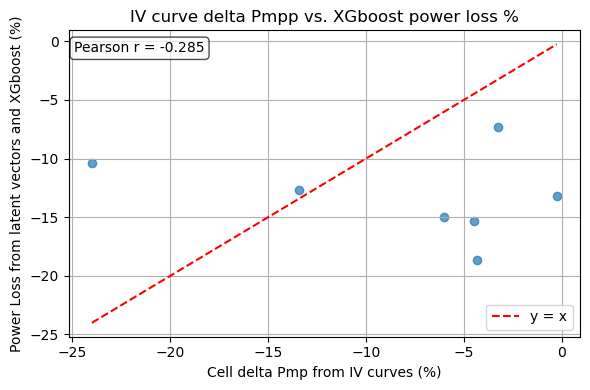
The current results show a low pearson score (<0.3). This is due to our limited amount of EL/IV pairs that we could use to train the XGboost model, 77 pairs. In the powerloss subpackage there is a jupyter notebook going through the steps how the xgboost model is trained. This could be done with more data when made avaialable.